
You can find the Linux agent update command in your HetrixTools dashboard and run it on your server to install the latest version.
Start by accessing the Uptime Monitors page from your HetrixTools dashboard.
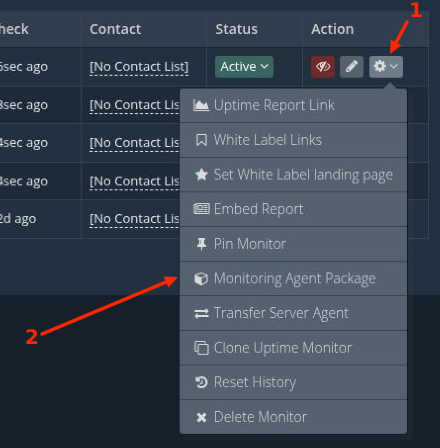
Open the gear drop-down menu for the uptime monitor linked to your server, then select “Monitoring Agent Package”.
In the pop-up window, click the “Update” button at the bottom.

On the update screen, select the “Linux” tab and click “Copy” to copy the update command.
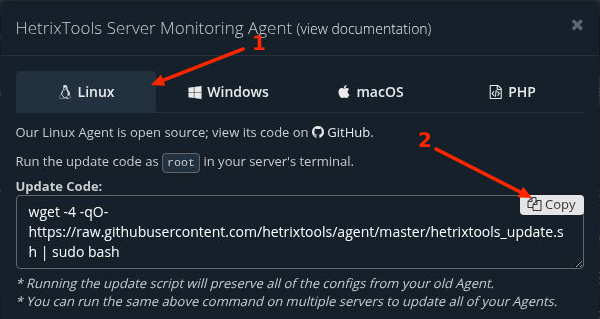
Log in to the server you want to update via SSH as root, then run the update command in your server’s terminal. The dashboard displays the command; the update runs when you execute it on the server.
Unlike the install command, the update command is not server-specific and can be run on multiple servers.
The update script downloads the latest agent while preserving your existing configuration. You can use the same update command on multiple servers.
After the script finishes successfully, return to your HetrixTools dashboard and confirm that your server’s metrics continue to update.
Please note that the agent does not update itself automatically. Run the update command whenever you want to update it.
Our Linux Agent is open source. You can inspect the update script on GitHub.